Function Type to Data Group Mapping
Flow Automation function types enable the collection and computation of a class of data for a special purpose. They must be manually loaded onto a field device. A function type is made up of a static numeric identifier and a name. Each function type is associated with one or more CygNet data groups. Which functions are available to you depends on field device firmware, field device configuration, and the device template file used.
In order for a function type to be used with CygNet, you must add at least one associated data group to the CygNet remote device. The associated CygNet data group is made up of all relevant messages required to support an associated function type. However, the relationship between function types and data groups is not strictly 1:1.
See the following possible scenarios for more information:
- One Function Type Supporting One or More Meters: A single function type might support several meter runs on the Flow Automation field device. In CygNet, however, an associated data group must be added for each meter run instance.
- One Function Type Supporting No Meters: Not all function types support meter runs. If a function type does not support a meter run, you might need only one instance of an associated data group.
- Multiple Associated Data Group Types: In some cases, multiple associated data group types are available for use with a function. You do not necessarily need to add all of these in order to support the function type. Which data group(s) you choose depends on your specific needs.
You may add any available data group to a remote device. However, if you attempt to retrieve data using a data group for which no associated function exists, the retrieval fails and an error message indicates the failure.
The error message in the UIS log is as follows:
- Cmd: DG_F_DEV device:FLOWAUTO, status:2:FAILED: Could not validate request: FunctionTypeName function index not found.
The error message dialog box in the DDS is as follows:
|
Error Message |
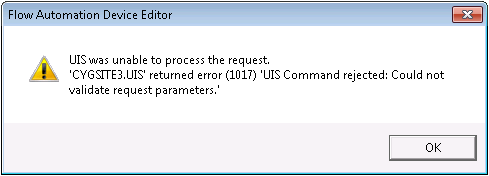
Poll your "RTU Config" data group to update and view available function types.
Function Types and Associated Data Groups
The following table lists Flow Automation function types supported by CygNet and their associated data groups. The Customer Code helps determine whether or not a function type is available for a given field device. For instance, 6 — Drip Control is only available with CO field devices. The customer code appears in positions 5 and 6 of the field device's software ID, which can be viewed in the "RTU Config" data group dialog box.
| Function Type | Associated Data Group(s) | Customer Code |
|---|---|---|
|
6 — Drip Control |
Drip Control Parms (native) |
CO |
|
9 — PID |
PID Parms (native) |
EG, MB, DV, CO |
|
11 — Analog History |
Historical Analog Config Historical Analog Data |
EG, MB, DV, CO |
|
12 — Tank Gauge |
Tank Function Tank Gauge Offsets Tank Sensor Configuration Tank Sensor Instantaneous Data |
EG, MB, DV |
|
12 — Auto Plunger |
Auto Plunger Lift Data (native) Auto Plunger Lift Parms (native) |
CO |
|
13 — Scanner |
Scanner Function Data |
EG, MB, DV |
|
13 — Manual Plunger |
Manual Plunger Lift Data Manual Plunger Lift Parms |
CO |
|
14 — Tank Gauge |
Tank Function Tank Gauge Offsets Tank Sensor Configuration Tank Sensor Instantaneous Data |
CO |
|
15 — Scanner |
Scanner Function Data |
CO |
|
16 — PID |
PID Parms (native) |
CO |
|
20 — Manual Plunger |
Manual Plunger Lift Data Manual Plunger Lift Parms |
EG, MB, DV |
|
21 — Flow Plunger |
Flow Plunger Cycle History Flow Plunger Lift Data Flow Plunger Lift Parms Flow Plunger Summary Historical Minute Data |
EG, MB, DV |


